Flock
Three Mac apps that left the nest.
I build apps for myself and my team whenever nothing out there does the job the way I want. Most of them never leave the office. These three got good enough to leave the nest.
And yes, they’re all birds. Mynahs can mimic human speech, so Mynah is the one that listens to your meetings. The peregrine falcon is the fastest animal alive, so Peregrine is the one that throws your screen onto a TV without the lag. And Odin kept two ravens that flew the world every day and came back with the news, which is basically email with better PR. Hence Raven.
Look at the icons and they fly like it, too: Mynah climbs, Raven glides, Peregrine dives.
A flock, if you will. (I will.)
Mynah
Meeting notes without a bot sitting in your call.
Mynah records your mic and the call’s audio straight off your Mac, transcribes it on the Mac, works out who said what, and writes the notes with whatever AI you already pay for: Claude Code, Codex, Grok, Apple Intelligence or your own API key.
Nothing joins the call. Nobody has to admit the bot.
brew install --cask fahadjibransheikh/flock/mynah - It remembers voices. Rename “Speaker 2” once and Mynah knows who that is in every meeting after.
- It speaks the way meetings actually sound. English, and Urdu or Hindi mixed with English, all transcribed on the Mac.
- Hold Fn and talk. Dictation anywhere you can type. The words land about a third of a second after you let go, however long you went on.
- On speakers instead of headphones? It strips out the echo, so the other side doesn’t get transcribed twice.
- Notes you can act on. Summary, decisions, action items and open questions, each one linked to the moment it was said. Action items go to Reminders or Linear.
- Your meeting text only goes where you sent it. Pick a notes provider and Mynah won’t quietly fall back to another one.

Peregrine
Your Mac on the TV, without the lag.
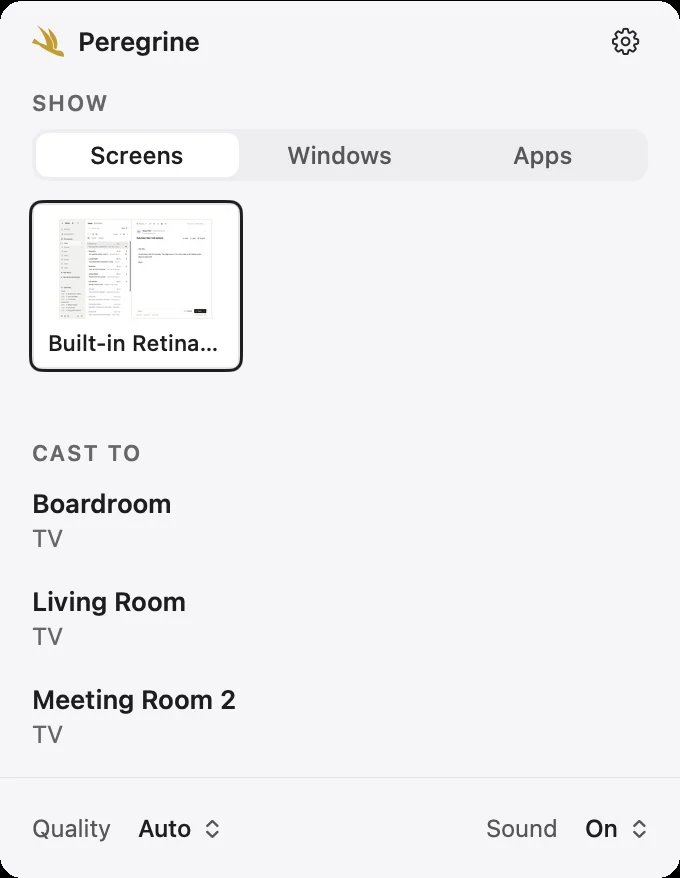
Puts your Mac’s screen (and sound) on a Google Cast TV, right from the menu bar. No Chrome, no extension. It speaks the same real-time Cast protocol Chrome does, so the TV keeps up with you instead of trailing a couple of seconds behind.
About a third of a second behind you, to be exact. The paid apps I found stream your screen as a video and run two or three seconds late (their words, not mine).
brew install --cask fahadjibransheikh/flock/peregrine - A screen, a window, or one app. Cast the whole display, a single window, or every window of one app. Stage Manager is fine with it.
- Picture only, when you want. Keep the sound on your Mac and send just the picture.
- Auto quality. Starts at 1080p, drops to 720p when the Wi-Fi gets moody, and climbs back when it recovers.
- Light on the Mac. Under 3% CPU while it casts.
Built for the meeting-room TVs at our office. Works on yours too.
Raven
Email, calendar and contacts that stay on your machine.
Email, calendar and contacts for Gmail, Outlook and plain old IMAP, in one app that keeps everything on your own machine. Raven talks to each provider directly. No company in the middle holding a copy of your inbox.
brew install --cask fahadjibransheikh/flock/raven - Your day in the menu bar. What’s left of today and tomorrow, a countdown as the next meeting gets close, and a Join button. Got Mynah? It becomes Join and record.
- Calendar that knows your inbox. Google, Outlook and iCloud calendars, and you answer invitations right from the message.
- The stuff you’d miss. Snooze, scheduled send, undo send, rules, saved searches and one-click unsubscribe.
- Not only a Mac app. Windows and Linux too, plus a phone layout if you run it on a server you can reach.
- It updates itself.
It’s my main email client. Every day, all day. It’s also alpha, so things still move, and I’m usually the first one to find out when they break.

Installing
Use Homebrew. The apps aren’t notarized by Apple yet, so a straight download gets you a scary macOS warning (it’s fine, I promise). The Homebrew install clears it for you. No Homebrew? brew.sh, one command.
brew install --cask fahadjibransheikh/flock/mynah brew install --cask fahadjibransheikh/flock/peregrine brew install --cask fahadjibransheikh/flock/raven Type the full name. A plain brew install raven gets you somebody else’s raven.
Something broken? Open an issue and tell me.